How to Change Your Name on Tinder (Spoiler: It's Stupidly Hard)
The three methods that actually work, ranked by how much of your life they'll destroy
TL;DR for People Who Can't Even Spell Their Own Name
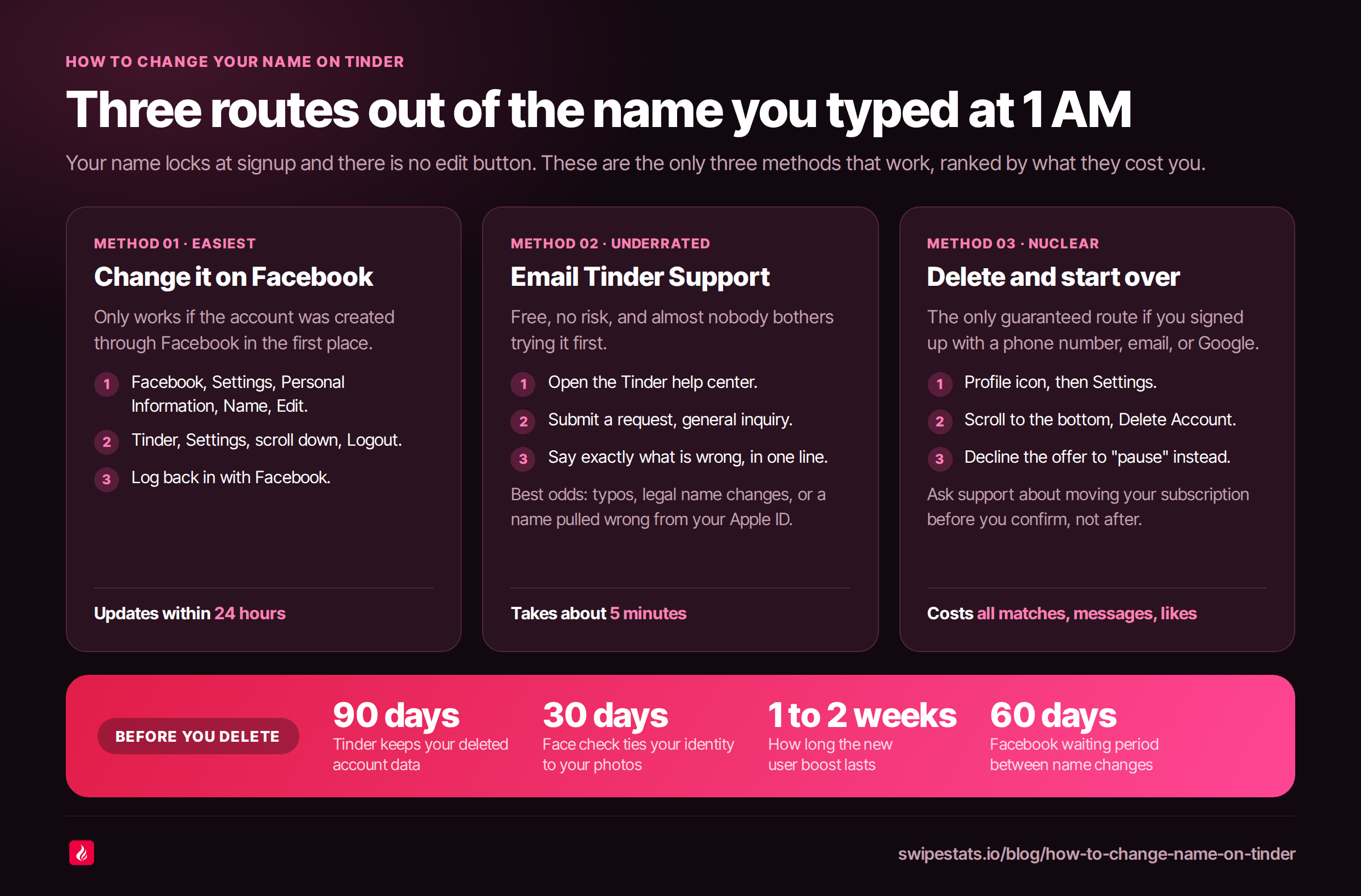
- Tinder locks your name at signup. There's no edit button. There never was. You're stuck with whatever you typed while half-asleep at 1 AM.
- Facebook users have an escape hatch. Change your name on Facebook, log out of Tinder, log back in. Done. (If your Tinder is linked to Facebook, which yours probably isn't because it's 2026.)
- Tinder Support actually helps sometimes. Typos, legal name changes, Apple ID pulling the wrong name. Worth a 5-minute email before you burn everything down.
- The nuclear option: delete your account and start fresh. You lose every match, every message, every like. All of it. Gone. Like your last relationship.
- Before you nuke anything, upload your Tinder data and face the real numbers. Your name is probably not the reason you're getting no matches. Your photos are.
So you signed up for Tinder, fat-fingered your name, and now you're walking around the app as "Jihn" or "Micheal" or whatever crime against spelling you committed. Or maybe you go by a nickname. Or maybe you just don't want your ex finding your profile by searching your government name like some kind of FBI agent.
Whatever the reason, you want to know how to change your name on Tinder. And I'm sorry to be the one writing this blog post (actually, I'm not), but Tinder has made this absurdly difficult for no good reason.
Let me walk you through the three methods that actually work. Ranked from "mildly annoying" to "scorched earth."
Can You Actually Change Your Name on Tinder? (Short Answer: Barely)
Let's get the bad news out of the way. Tinder does not have a "change name" button. Never has. Probably never will. Your name gets locked the second you create your account, and Tinder treats it like it's carved into stone tablets and delivered by Moses himself.
Why? Fraud prevention, supposedly. Your name is tied to your account identity. Tinder doesn't want people catfishing under rotating aliases like some kind of dating app spy novel. Fair enough. But it also means if you accidentally signed up as "Jonh" instead of "John," you're stuck looking illiterate to every potential match.
There are two paths forward. If you signed up through Facebook, you have a relatively painless option. If you signed up with your phone number, email, or Google account, you're mostly screwed. But not completely.
Method 1: Change Your Tinder Name via Facebook (The Easy Way, If You're Lucky)
This only works if your Tinder account is linked to Facebook. And honestly, fewer and fewer people do this anymore because linking your dating profile to the social network where your mom comments on every post feels... problematic.
But if you're one of the lucky ones, here's what to do:
- Open Facebook. Go to Settings > Personal Information > Name > Edit.
- Enter your new name. Review the change. Save it.
- Open Tinder. Go to Settings. Scroll all the way down. Tap Logout.
- Log back in with Facebook.
- Your name should update within 24 hours. Maybe faster if the algorithm gods are feeling generous (they rarely are).
A few things to know. Facebook only lets you change your name once every 60 days, so don't treat this like a revolving door. And if you're trying to change your name to something Facebook considers suspicious, like a single word or "Batman McLovinface," they'll ask for ID. Facebook has zero chill about name authenticity these days.
Also, this method ONLY works if you originally created your Tinder account through Facebook. You can't retroactively link Facebook and expect it to override your existing name. Tinder doesn't work that way. Nothing works that way. Life doesn't work that way.
Method 2: Contact Tinder Support (The Underrated Option Nobody Tries)
I know what you're thinking. "Contact support? For a dating app? They'll never respond." And look, you're not entirely wrong. Tinder support is about as reliable as a Tinder date showing up on time. But it costs nothing, takes five minutes, and actually works in specific cases.
This is your best bet if:
- You made a typo at signup (the most common reason, and honestly the most embarrassing)
- You had a legal name change
- Your name got pulled incorrectly from Apple ID (this happens way more than you'd think)
- Facebook synced the wrong name variant
Here's how. Go to the Tinder help center. Hit "Contact Us" and submit a request. Choose "Trouble with account login" or general inquiry. Explain your situation clearly. Be specific. "My name is spelled wrong" works better than a five-paragraph essay about your identity journey.
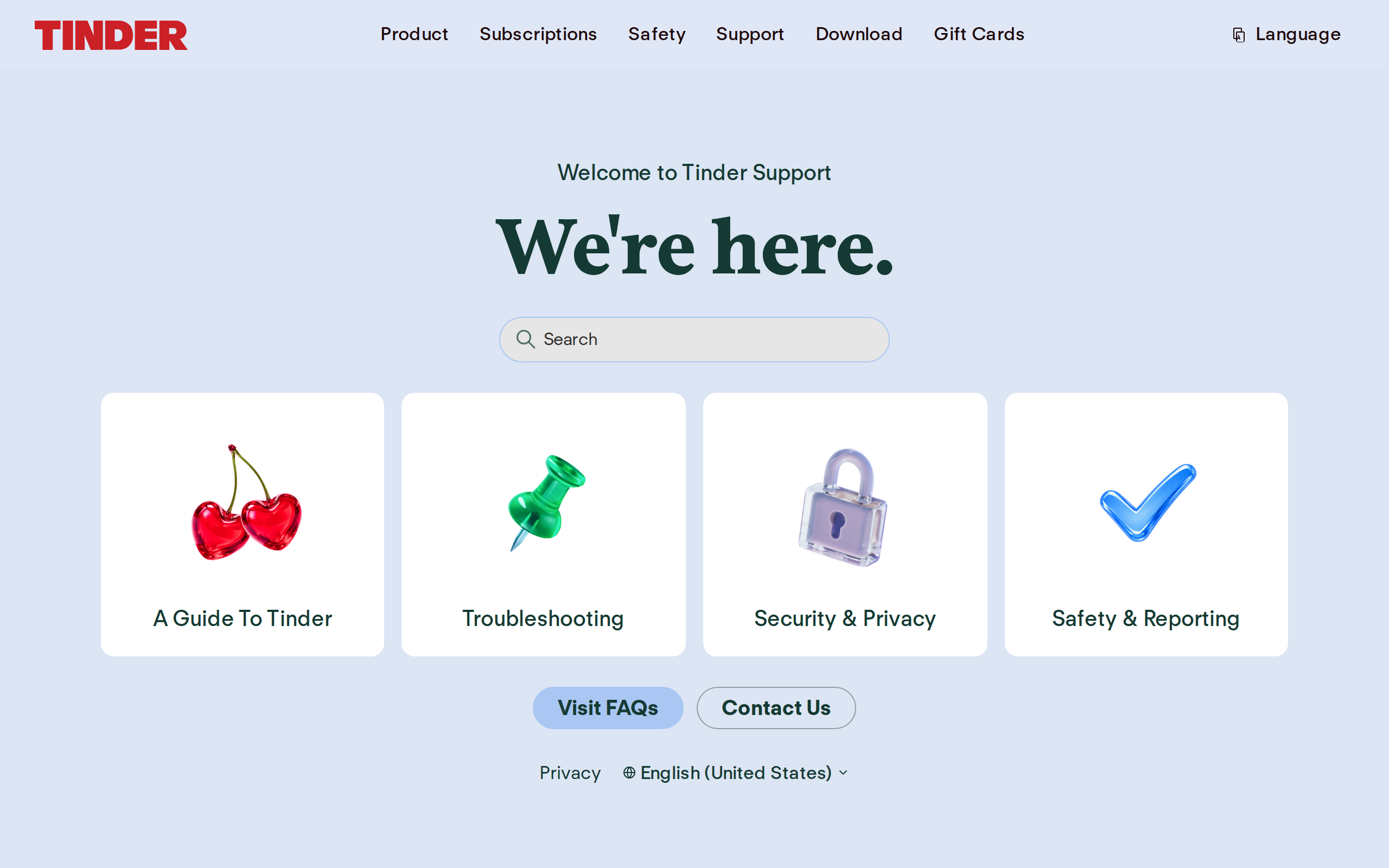
Tinder Support home
Apple ID users, pay attention. iOS sometimes pulls your Apple ID display name instead of what you actually typed. So if your Apple ID says "Jonathan" but everyone calls you "Jon," congratulations, you're now "Jonathan" to every potential match on the platform. Tinder Support can usually fix this.
Will they help? Maybe. Will they respond within this geological epoch? Possibly. But it beats deleting your entire account over a typo.
Method 3: Delete Your Account and Start Fresh (The Nuclear Option)
When all else fails, there's always the big red button. This is the only guaranteed method for people who signed up with a phone number, email, or Google account. It works. But it costs you everything. If you want the full walkthrough first, we have a whole guide on how to delete your Tinder account.
Here's the step-by-step demolition:
- Open Tinder. Tap your profile icon (bottom right).
- Tap Settings (the gear icon, because settings always hide behind gears, as if your love life is a machine).
- Scroll to the bottom. Tap "Delete Account."
- Follow the prompts. Tinder will try to convince you to "pause" instead. Don't fall for it. That's like putting a band-aid on a house fire.
- Confirm deletion.
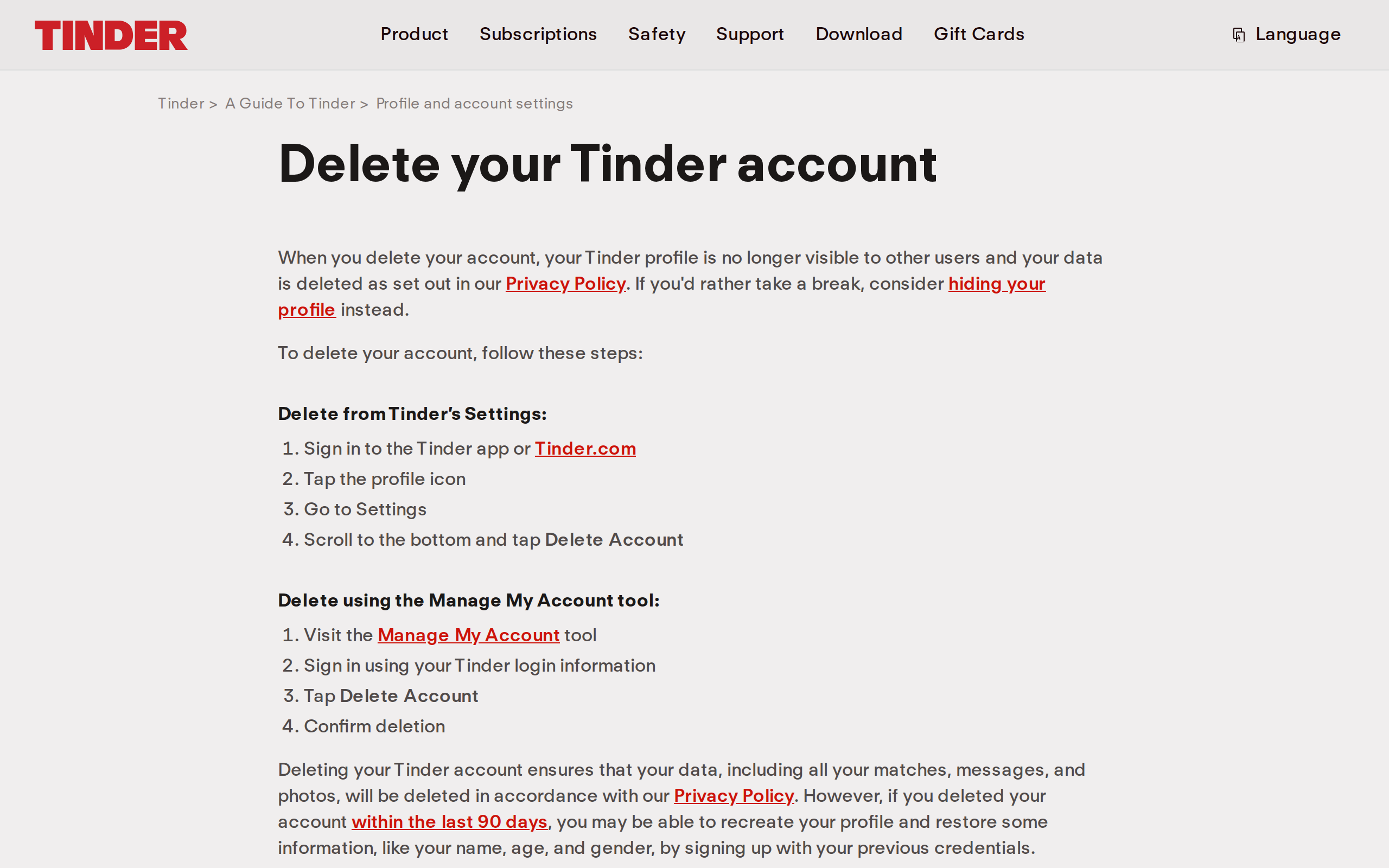
Tinder Help Center deletion steps
What you permanently lose: ALL matches. ALL messages. ALL conversation history. ALL received likes. Every photo stored on Tinder. Every Boost and Super Like you paid for. That conversation where someone actually seemed into you? Gone. Like tears in rain, as Roy Batty would say.
What you might keep: your paid subscription. Contact Tinder Support BEFORE deleting to request a transfer. No guarantees, but better than finding out after the fact.
What you don't lose: the ability to re-register with the same phone number, email, or Google account. You can come back. Just... as a completely different profile, with no history, starting from absolute zero.
The Dirty Truth About Account Resets (Read This Before You Delete)
Here's what nobody else writing these "how to change name on Tinder" articles tells you. Deleting your account isn't just a name change. It's a full algorithm reset. And that cuts both ways.
The good news: fresh accounts get a new user boost. Tinder shows your profile to significantly more people for roughly 1-2 weeks. It's like the app rolls out the red carpet for you, then yanks it away once you've gotten comfortable. Classic Tinder.
The bad news: Tinder is not stupid. They track you by phone number, device ID, IP address, photo metadata, and (since 2025) biometric face-check data. So "starting fresh" is not as fresh as you think.
The 90-day rule. Tinder stores your deleted account data for approximately 90 days. If you recreate your account within that window, there's a real chance they link you to your old profile and restore your old ranking score. Your "fresh start" becomes a stale restart.
Same photos plus same phone equals a high risk of being flagged as a repeat account. And flagged accounts get shadowbanned. Which means you'll be swiping into the void while your profile sits invisible to everyone. Like shouting into a pillow. Very therapeutic. Very ineffective.
The real kicker? Tinder's face-check verification ties your identity to your photos for at least 30 days post-deletion. So even if you switch phone numbers and emails, your face is literally in their database. Making true fresh starts harder than explaining to your parents what a "situationship" is.
Bottom line: if you're nuking your account just to fix a Tinder name change, do it properly. Wait the full 90 days. Use new photos. And maybe read our piece on why Tinder matches disappear so you know what you're getting into.
Does Your Name Actually Affect Your Matches? (Probably Not, But Here's the Data)
Let's address the elephant in the room. Some of you aren't changing your name because of a typo. You're changing it because you think your name is tanking your match rate. And I get it. But the data tells a more complicated story.
A 2019 field experiment tested identical profiles with different names. A profile named "Mohamed" got a 4.0% match rate versus 7.1% for "Maurice." That's a 77.5% difference. Based solely on name. Which is genuinely depressing and says a lot more about society than it does about dating apps.
There's also some evidence that names starting with A through M slightly outperform N through Z in interfaces that use alphabetical sorting. But Tinder doesn't sort alphabetically, so this is basically trivia for your next bar night (if you ever get a date to bring to one).
Here's what actually matters. From our analysis of 7,000+ real profiles with 294 million swipes and 3.14 million matches, match rate variance is dominated by three things: photo quality, swipe selectivity, and activity patterns. Name doesn't appear as a meaningful variable. Not even close.
Your first photo is doing 90% of the heavy lifting. Your bio handles another 8%. Your name accounts for roughly the same amount of swipe decisions as the font Tinder uses to display it. Which is to say: almost none.
If you're getting no likes on Tinder, I promise you, fixing your name is like rearranging deck chairs on the Titanic. Start with the iceberg. The iceberg is your photos.
Before You Nuke Your Account, Do This First
If you're considering the nuclear option because your matches are dead and you want a "fresh start," put down the delete button for one second.
Download your Tinder data first. Go to Settings > Data > Request your data. It takes up to 30 days to arrive, which is somehow both too long and not long enough to process the emotional damage it'll contain.
Or better yet, upload your data to SwipeStats before going nuclear. You might discover that the real problem is your swipe behavior (swiping right on literally everyone tanks your score), your photo quality, or your activity patterns. Not your name. Almost never your name.
Our aggregate data can show you exactly how you compare to other users in your demographic. It's like a dating app report card. Except this one actually helps you improve instead of just making you feel bad about yourself.
If your match rate is genuinely tanking after months, a fresh start might help. But go in with data, not desperation. There's a difference between a strategic reset and rage-quitting because you don't like seeing "Jihn" on your own profile.
FAQ: The Questions You're Stress-Googling Right Now
The Actual Game Plan (For People Who Read This Far)
Here's what to do, in order:
- Try Tinder Support first. Five minutes, zero risk. If it's a typo or Apple ID issue, they can often fix it.
- Check if you're linked to Facebook. If yes, change it there and re-login. Easy.
- If neither works, decide if deletion is worth it. You're losing everything. Make sure the name is actually the problem (it probably isn't).
- If you delete, do it right. Wait 90 days. Use new photos. Come back with a profile that doesn't look like it was built during a panic attack.
- Analyze your data before and after. Upload to SwipeStats so you actually know what changed. Otherwise you're just guessing, and guessing is how you ended up as "Jihn" in the first place.
The name on your Tinder profile matters less than you think. But if it's genuinely wrong, now you know how to fix it. Go forth. Spell your name correctly this time.
Sources
About the Author

Also from Kristian: Homi is Kristian's AI workspace for organizing home searches with your partner, family, or agent.